
As an Amazon Associate I earn from qualifying purchases. This article may contain affiliate links, at no extra cost to you.
Phone navigation falls short the moment you hit rural dead zones, overheat a battery on a sunny dashboard, or get interrupted by incoming calls at a complex highway interchange. A dedicated GPS navigator keeps turn-by-turn routing on a purpose-built, always-ready screen with preloaded offline maps and clear driver alerts.
The biggest mistake buyers make is choosing by screen size alone instead of matching the navigator to their vehicle. Below, we compare two passenger-car standouts from Garmin—the 7-inch DriveSmart 76 and 8-inch DriveSmart 86—against the commercial-grade Rand McNally TND550 so you can pick the right dedicated GPS unit for your dash and route.
Quick Verdict: Best Dedicated GPS Navigators
- #1 Top Pick (Best Everyday Car GPS): Garmin DriveSmart 76 — The sweet spot for passenger cars, balancing a crisp 7-inch screen, Garmin Voice Assist, Wi-Fi map updates, and live traffic/weather via the Garmin Drive app.
- Best Large-Screen Navigator: Garmin DriveSmart 86 — Upgrades you to a higher-resolution 8-inch dual-orientation display (landscape or portrait) for effortless at-a-glance readability.
- Best Commercial Truck GPS: Rand McNally TND550 — Built specifically for commercial drivers with truck-dimension routing, restriction alerts, truck-stop POIs, and a compact 5-inch footprint.
Top Picks at a Glance
| Category | Product | Display & Routing | Best For | Check Price |
|---|---|---|---|---|
| 🏆 Best for Everyday Drivers | Garmin DriveSmart 76 | 7-inch · Passenger Car | Daily commuting, road trips, balanced dash fit | Check Price → |
| 🚀 Best Large Display | Garmin DriveSmart 86 | 8-inch Dual-Orientation · Passenger Car | Maximum map visibility and larger turn prompts | Check Price → |
| 💼 Best for Commercial Trucking | Rand McNally TND550 | 5-inch · Commercial Truck | Truck-specific routing, clearances, and truck POIs | Check Price → |
1. Garmin DriveSmart 76 — Best Overall for Everyday Drivers
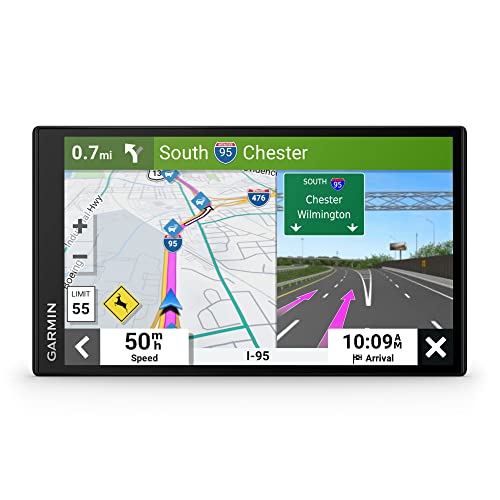
Best for: Commuters, families, and road-trippers who want a spacious, easy-to-read car GPS without crowding a standard sedan or SUV windshield.
The Garmin DriveSmart 76 hits the practical sweet spot for passenger-car navigation. Its 7-inch touchscreen gives you crisp lane guidance, upcoming-turn previews, and driver alerts (such as school zones, sharp curves, and speed changes) while staying compact enough for most dashboards. Preloaded maps handle core navigation completely offline, and built-in Wi-Fi lets you update maps and software without plugging into a computer.
Garmin Voice Assist lets you speak destinations hands-free, and pairing the navigator with a compatible smartphone running the Garmin Drive app unlocks live traffic, weather, fuel prices, and parking availability. Built-in Tripadvisor traveler ratings and travel POIs make highway stops easier to plan on long drives.
Verified Key Specs
- Screen Size: 7-inch touchscreen (landscape)
- Routing Type: Passenger-car navigation with preloaded maps and included map updates
- Voice & Alerts: Garmin Voice Assist, hands-free features, and driver awareness alerts
- Connectivity: Built-in Wi-Fi (for updates), Bluetooth, and USB; live traffic, weather, fuel, and parking via the Garmin Drive smartphone app
Before You Buy: Core offline routing works standalone, but live traffic, weather, and Alexa-connected features require pairing with a compatible smartphone. It does not include a built-in dash camera, and it is not designed for commercial-truck weight or clearance routing.
2. Garmin DriveSmart 86 — Best Large-Screen Navigator
Best for: Drivers in SUVs, trucks, or vans who prioritize maximum legibility, larger touch targets, and the flexibility of portrait or landscape mounting.
The Garmin DriveSmart 86 delivers the same core navigation software, Garmin Voice Assist, driver alerts, Wi-Fi map updates, and Garmin Drive app live services as the DriveSmart 76, but steps up to a sharper, higher-resolution 8-inch display. That extra inch makes complex multi-lane exits noticeably faster to read at highway speed.
Its standout hardware advantage is dual-orientation mounting. You can rotate the screen to portrait mode to see further ahead along your route—much like a giant smartphone—or keep it in landscape mode for wider map context.
Verified Key Specs
- Screen Size: 8-inch high-resolution touchscreen with dual orientation (landscape or portrait)
- Routing Type: Passenger-car navigation with preloaded maps and Wi-Fi map updates
- Voice & Alerts: Garmin Voice Assist and driver awareness alerts
- Connectivity: Wi-Fi, Bluetooth, and USB; live traffic, weather, fuel, and parking via the Garmin Drive app
Before You Buy: An 8-inch unit has a substantial physical footprint. Measure your windshield or dashboard mounting spot first to make sure it will not obstruct your sightline or block climate and infotainment controls. Like the 76, it requires phone pairing for live services and has no built-in dash cam.
3. Rand McNally TND550 — Best for Commercial Truck Drivers
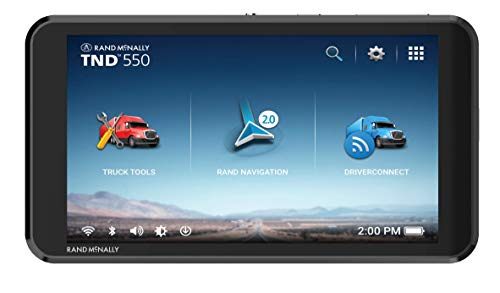
Best for: Commercial truck drivers and owner-operators who need truck-specific routing, restriction warnings, and a compact cab footprint.
The Rand McNally TND550 plays in a completely different category from passenger-car GPS units. Powered by Rand Navigation, it calculates routes around your entered truck dimensions and restrictions across USA and Canada map coverage—helping commercial-truck drivers steer clear of low bridges, weight-restricted roads, and tight residential turns.
It also packs professional-driver utilities including truck-focused POIs, fuel information, logs, weather overlays, and traffic tools inside a compact 5-inch (854 × 480) housing with 32 GB of internal storage and a suction-cup mount that leaves plenty of windshield visibility clear.
Verified Key Specs
- Screen Size: 5-inch touchscreen (854 × 480 resolution)
- Routing Type: Commercial-truck routing (USA & Canada maps) with truck POIs and restriction warnings
- Hardware: 32 GB storage, 1000 mAh battery, suction-cup mount
- Connectivity: Wi-Fi, Bluetooth, and Micro USB
Before You Buy: Skip this model if you drive a regular car—you will pay for commercial routing tools you do not need while giving up screen size. For truckers, keep maps updated over Wi-Fi and always verify posted clearances, weight limits, and road signs on the road; no GPS database replaces driver judgment.
Buying Guide: Choosing the Right Dedicated GPS Navigator
- Start with vehicle and routing type: Passenger-car units (Garmin DriveSmart 76/86) are built for standard roads and travel POIs, whereas commercial units (Rand McNally TND550) factor in truck dimensions, clearances, and freight restrictions. Never substitute a car GPS for commercial trucking.
- Match screen size to your cabin: A 5-inch unit stays unobtrusive in tight cabs; a 7-inch screen balances readability and dash space for most cars; an 8-inch display excels in larger vehicles where you sit further from the windshield.
- Understand offline vs. connected features: Preloaded maps keep core turn-by-turn routing working without cell service, but real-time traffic, weather overlays, and fuel prices still rely on smartphone pairing (Garmin Drive app) or a Wi-Fi/hotspot connection (Rand McNally).
- Update before long trips: Connect your unit to home Wi-Fi before major highway travel so new exits, speed limits, and road restrictions are current.
Side-by-Side Comparison
| Model | Screen Size | Routing Type | Key Features | Connectivity | Check Price |
|---|---|---|---|---|---|
| Garmin DriveSmart 76 | 7-inch | Passenger Car | Garmin Voice Assist, driver alerts, Tripadvisor POIs, Wi-Fi map updates | Wi-Fi, Bluetooth, USB | Check Price → |
| Garmin DriveSmart 86 | 8-inch (Dual-Orientation) | Passenger Car | Higher-res 8-inch portrait/landscape screen, Voice Assist, driver alerts, Wi-Fi updates | Wi-Fi, Bluetooth, USB | Check Price → |
| Rand McNally TND550 | 5-inch (854 × 480) | Commercial Truck | Truck-specific routing, truck POIs, warnings, fuel logs, 32 GB storage | Wi-Fi, Bluetooth, Micro USB | Check Price → |
Frequently Asked Questions
Why buy a dedicated GPS navigator instead of using a smartphone?
Dedicated GPS units store maps offline so routing continues seamlessly through rural dead zones, keep navigation on a large glare-resistant screen free from texts or calls, and spare your phone battery from constant GPS drain and dashboard heat.
Do I need a smartphone for live traffic and weather?
Core turn-by-turn navigation works completely offline on all three models. However, live traffic, weather, fuel prices, and parking alerts on the Garmin DriveSmart 76 and 86 require pairing with the Garmin Drive app on a compatible smartphone, while connected services and updates on the Rand McNally TND550 use Wi-Fi or a mobile hotspot.
Should I choose the Garmin DriveSmart 76 or DriveSmart 86?
Choose the DriveSmart 76 if you want a balanced 7-inch footprint for a sedan or compact SUV. Step up to the DriveSmart 86 if you have a larger dashboard and want an 8-inch higher-resolution screen with portrait or landscape mounting.
Can a truck GPS replace posted road signs and bridge clearance checks?
No. Commercial routing databases are valuable planning aids, but temporary detours, construction, and updated weight or height restrictions mean drivers must always obey posted signs and physical clearances.