
You rely on precise navigation to save time, reduce stress, and stay focused on the road. A dedicated GPS navigator can provide offline maps, clear turn-by-turn guidance, and driver-focused alerts without making your phone the main navigation screen.
This guide compares two Garmin car GPS units for everyday driving and one Rand McNally truck GPS for commercial drivers, so you can choose based on screen size, connected features, and whether you need passenger-vehicle or truck-specific routing.
Affiliate disclosure: This roundup is reader-supported. When you click through qualifying links, we may earn a referral commission at no extra cost to you.
Quick Verdict
Best overall for everyday drivers: Garmin DriveSmart 76 offers a readable 7-inch display, voice-assisted navigation, Wi-Fi map updates, and access to live services when paired with the Garmin Drive app.
Best large-screen option: Garmin DriveSmart 86 gives you an 8-inch dual-orientation display and higher display resolution for drivers who want maximum map visibility.
Best for commercial truck drivers: Rand McNally TND550 is the specialist choice because its routing and POIs are designed around truck dimensions, restrictions, and professional-driver needs.
Top Picks
|
Category |
Product |
Best For |
|---|---|---|
|
🏆 Best for Everyday Drivers |
Commuting and road trips |
|
|
🚀 Best Large Display |
Maximum map visibility |
|
|
💼 Best for Commercial Trucking |
Truck-specific routing |
Selection Criteria
You want a navigation system that reliably guides you without adding unnecessary distraction. We prioritized routing purpose first: passenger-car navigation for the Garmin models and commercial-truck routing for the Rand McNally. We also compared screen size and readability, offline mapping, voice interaction, update options, mounting, and connected services such as traffic and weather.
Connected features matter, but they do not work the same way on every device. The Garmin models use the Garmin Drive app on a compatible paired smartphone for features such as live traffic, weather, fuel prices, and parking information. The TND550 uses truck-focused Rand Navigation and supports Wi-Fi for updates and connected navigation features.
Before You Buy
- Choose the right routing type: passenger-car GPS and commercial-truck GPS are not interchangeable for professional routing needs.
- Check dashboard space: an 8-inch navigator is easier to read but occupies more room than a 5- or 7-inch unit.
- Expect connected features to need a connection: live traffic, weather, fuel, parking, or other real-time services may require a paired phone, Wi-Fi, or hotspot depending on the device.
- Update maps before long trips: map and software updates can reduce avoidable routing problems, but road conditions and restrictions can still change.
- Keep driving as the priority: set routes and adjust detailed settings while parked whenever possible.
Garmin DriveSmart 76

You get a driver-focused car GPS with a 7-inch touchscreen that is large enough for quick map checks without taking over most dashboards. Garmin Voice Assist can handle navigation requests, while the unit’s preloaded maps let core turn-by-turn navigation work without relying on cellular coverage.
Pairing the DriveSmart 76 with the Garmin Drive app adds connected services such as live traffic, weather, fuel prices, and parking information. Built-in Wi-Fi also supports map and software updates without requiring a computer.
This is the most balanced choice here for ordinary passenger-car use. It gives you a larger screen than many compact GPS units while staying more dashboard-friendly than the 8-inch DriveSmart 86.
What People Say
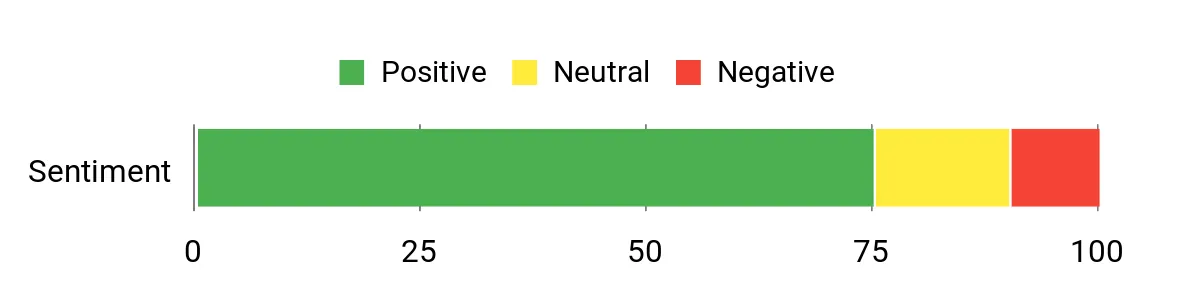
Buyer feedback commonly focuses on the easy-to-read screen, straightforward navigation, and useful connected features. Some users also mention that wireless updates can take time and that several live or cloud-based features depend on smartphone pairing.
Review note: Ratings and review totals change over time, so check the most recent Amazon feedback before buying.
|
Pros |
Cons |
|---|---|
|
✅ Large, easy-to-read 7-inch display |
❌ Smaller and lower resolution than the DriveSmart 86 |
|
✅ Voice-assisted navigation and hands-free features |
❌ Live services and Alexa features depend on compatible smartphone pairing |
|
✅ Live traffic, weather, fuel, and parking information through the Garmin Drive app |
❌ No built-in dash camera |
Versatility
The DriveSmart 76 suits commuters, family drivers, rental-car travelers, and road-trippers who want dedicated passenger-car navigation. It is not designed for commercial-truck routing based on vehicle height, weight, or other truck restrictions.
Travel Ready
Preloaded road maps, driver alerts, points of interest, and Wi-Fi map updates make the DriveSmart 76 practical for longer trips. For live traffic, weather, fuel prices, and parking information, pair it with a compatible smartphone running the Garmin Drive app.
Key Benefits
- Readable 7-inch touchscreen
- Garmin Voice Assist for navigation requests
- Preloaded maps with included map updates
- Garmin Drive app support for connected live services
Who Should Buy This?
Choose the DriveSmart 76 if you want a dedicated car GPS with a large screen but do not need the extra dashboard footprint of the 8-inch DriveSmart 86.
Who Should Avoid This?
Skip it if you need commercial-truck routing or if you want a GPS with a built-in dash camera.
Check Current Amazon Availability
Garmin DriveSmart 86

The DriveSmart 86 is the large-screen choice in this roundup. Its 8-inch high-resolution touchscreen can be mounted in landscape or portrait orientation, making map details and turn prompts easier to see when you prefer a more prominent navigation display.
Like the DriveSmart 76, it supports voice-assisted navigation, driver alerts, Wi-Fi map updates, and connected live services through the Garmin Drive app. When paired with a compatible smartphone, you can access live traffic, weather, fuel prices, parking information, and supported voice features.
The tradeoff is physical size. The larger display can be excellent for readability, but you should confirm that the mount location does not block your view or interfere with vehicle controls.
What People Say
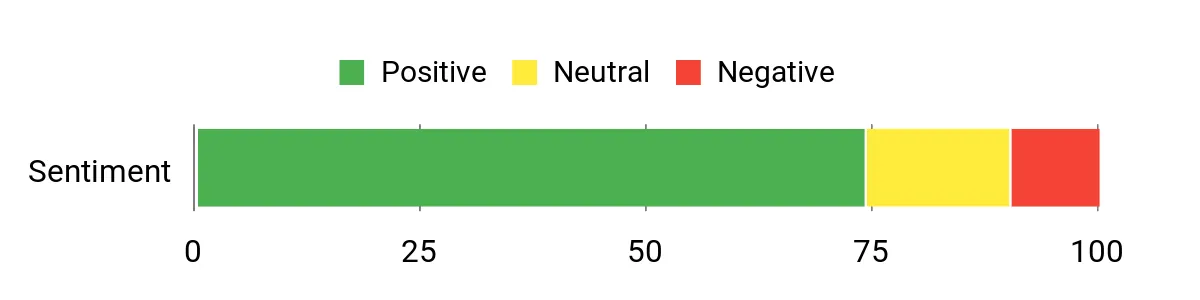
Buyer feedback often highlights the large display and easier map visibility. Some users also point out that the device takes more dashboard space and that connected features still rely on phone pairing.
Review note: Ratings and review totals change over time, so check the most recent Amazon feedback before buying.
|
Pros |
Cons |
|---|---|
|
✅ High-resolution 8-inch display with dual orientation |
❌ Larger footprint may not suit compact dashboards |
|
✅ Voice-assisted navigation and driver alerts |
❌ Live and cloud-connected features require compatible phone pairing |
|
✅ Live traffic, weather, fuel, and parking information through the Garmin Drive app |
❌ Not designed for commercial-truck routing |
|
✅ Higher display resolution than the DriveSmart 76 |
❌ No built-in dash camera |
Versatility
This unit fits passenger-car drivers who place a high value on visibility: commuters, families on road trips, and drivers who prefer a standalone navigator over a phone. It is less ideal if dashboard space is tight or if you need truck-specific routing.
Travel Ready
The DriveSmart 86 combines preloaded road maps, driver alerts, travel points of interest, and Wi-Fi map updates with an 8-inch dual-orientation screen. The large display can also make it easier for a passenger to review upcoming route details.
Key Benefits
- Large 8-inch dual-orientation touchscreen
- Higher display resolution than the DriveSmart 76
- Voice-assisted navigation and driver alerts
- Garmin Drive app support for connected live services
Who Should Buy This?
Choose the DriveSmart 86 if screen size is your top priority and your dashboard has enough space for an 8-inch navigator.
Who Should Avoid This?
Skip it if you prefer a smaller windshield or dashboard footprint or need commercial-truck routing.
Check Current Amazon Availability
Rand McNally TND550

The TND550 is different from the two Garmin models because it is a 5-inch GPS built specifically for commercial-truck navigation. Rand Navigation can calculate routes using truck information and provides truck-focused POIs, warnings, traffic information, weather overlays, fuel information, and other professional-driver tools.
Its smaller screen saves dashboard space, and the unit uses a suction-cup mount. Rand McNally lists a 5-inch 854 x 480 display, 32 GB of storage, Bluetooth, Wi-Fi, and a 1000 mAh battery capacity.
Choose it for truck-specific guidance, not as a general upgrade over a passenger-car GPS. Commercial drivers should still verify posted signs, restrictions, clearances, and current road conditions because no navigation database can replace on-road judgment.
What People Say
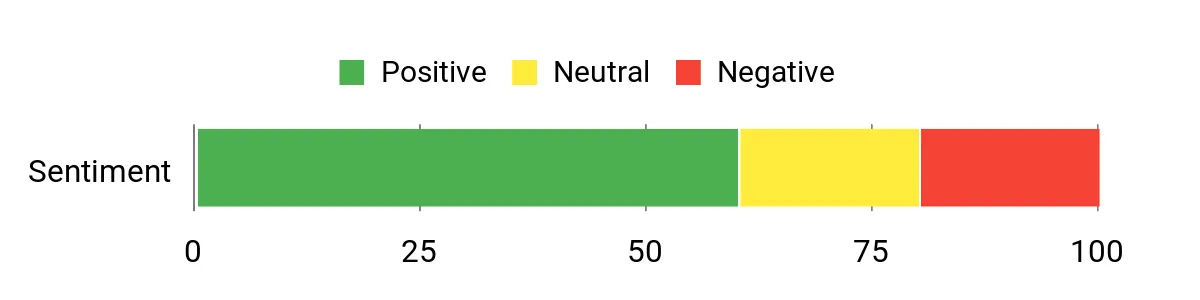
Buyer feedback commonly values truck-focused routing and the compact form factor. Some users report frustrations with rerouting or signal behavior, so checking recent reviews and keeping maps and software updated is sensible before relying on it for regular routes.
Review note: Ratings and review totals change over time, so check the most recent Amazon feedback before buying.
|
Pros |
Cons |
|---|---|
|
✅ Built for commercial-truck routing and truck-focused POIs |
❌ 5-inch display is much smaller than the Garmin options |
|
✅ Compact size with suction-cup mount |
❌ Not intended as a passenger-car feature upgrade |
|
✅ Wi-Fi, Bluetooth, map updates, weather, traffic, and fuel tools |
❌ Connected and advanced features can require Wi-Fi access |
Versatility
This navigator is aimed at commercial drivers and owner-operators who need routing that considers truck information and restrictions. Passenger-car drivers will usually get a more suitable feature set from one of the Garmin DriveSmart models.
Travel Ready
The TND550 supports USA and Canada map coverage, updated maps, truck-focused POIs, traffic and weather tools, and a compact 5-inch format. For connected or advanced services, plan for Wi-Fi or hotspot access when required.
Key Benefits
- Truck-specific routing based on entered truck information
- Compact 5-inch touchscreen
- Truck POIs, warnings, traffic, weather, and fuel tools
- Wi-Fi and Bluetooth connectivity
Who Should Buy This?
Choose the TND550 if you are a commercial-truck driver who wants a compact dedicated GPS with truck-aware routing and driver tools.
Who Should Avoid This?
Passenger-car drivers who do not need truck restrictions, truck POIs, or professional-driver tools will usually be better served by a car-focused GPS.
Check Current Amazon Availability
FAQ
Are Dedicated GPS Units More Accurate Than Smartphone Navigation?
Not necessarily. Both dedicated GPS units and modern smartphones can provide accurate turn-by-turn navigation. The stronger reason to choose a dedicated navigator is that it keeps navigation on a purpose-built screen, can use preloaded maps for core routing, and does not make your phone the primary display. Real-time services may still require a phone or internet connection depending on the model.
Do I Need To Pair A GPS With My Phone For Live Traffic And Voice Features?
Core navigation on the Garmin DriveSmart models can work without phone pairing, but Garmin’s live traffic, weather, fuel, parking, and Alexa-connected features depend on a compatible smartphone and the Garmin Drive app. The Rand McNally TND550 uses Wi-Fi for updates and certain connected or advanced features. Always check the exact feature requirements for the model you buy.
What Should I Consider When Choosing A Dedicated GPS Unit?
Start with routing type. Passenger-car drivers should prioritize screen size, map coverage, voice controls, mounting, and live-service options. Commercial-truck drivers should look for routing that uses truck information and restrictions. Also compare update methods, dashboard space, connectivity requirements, and whether you want a standalone navigator or are comfortable using a phone for connected data.
Can A Truck GPS Replace Posted Road Signs And Clearance Checks?
No. Truck-routing databases are helpful planning tools, but commercial drivers still need to follow posted signs, legal restrictions, bridge clearances, weight limits, temporary closures, and other current road information.
Customer Preferences
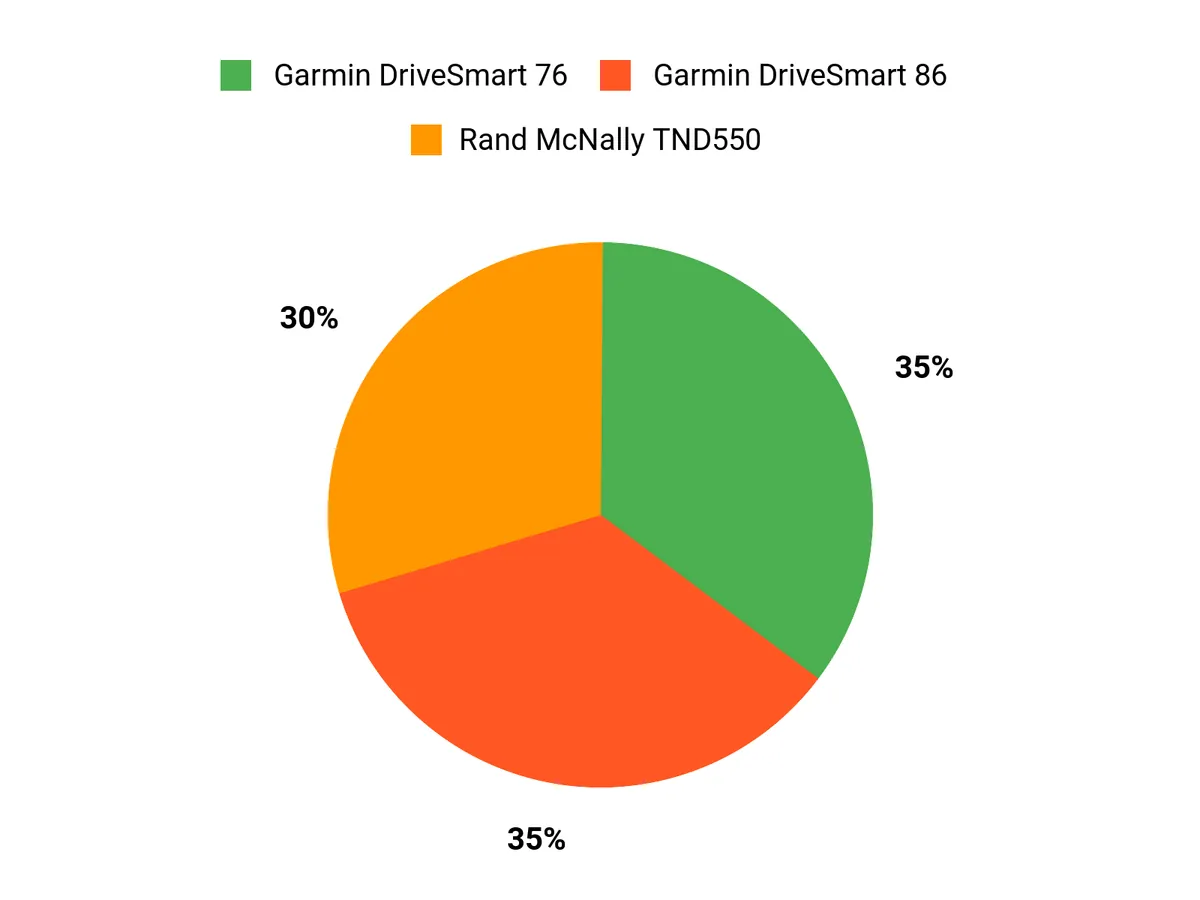
Your choice comes down to routing type and screen preference. The Garmin DriveSmart 76 is the balanced passenger-car option, while the DriveSmart 86 is better if you want the largest display and higher resolution. The Rand McNally TND550 is the specialist pick for commercial truck routing rather than a direct passenger-car alternative.
Wrapping Up
For most passenger-car drivers, the Garmin DriveSmart 76 offers the best balance of screen size, dedicated navigation, voice features, and connected services. If you want the biggest map view and have enough dashboard space, the Garmin DriveSmart 86 adds an 8-inch dual-orientation display with higher resolution.
If you drive a commercial truck, the Rand McNally TND550 belongs in a different category: it is built around truck-specific routing, restrictions, and professional-driver tools. Choose based on your vehicle and routing needs, then check current product details and availability before ordering.
| Garmin DriveSmart 76 | Garmin DriveSmart 86 | Rand McNally TND 550 | |
|---|---|---|---|
|
|
|
|
|
| Best For | Everyday passenger-car navigation | Large-screen passenger-car navigation | Commercial-truck navigation |
| Screen Size | 7 Inches | 8 Inches | 5 Inches |
| Special Highlights |
|
|
|
| Connectivity |
|
|
|
| Check Current Amazon Availability | Check Current Amazon Availability | Check Current Amazon Availability |