
In the U.S., there is no single flat price to replace an iPad screen. With AppleCare+, Apple currently lists a $29 screen-damage service fee for iPad Air (M2 and newer), iPad Pro (M4 and newer), iPad (A16), and iPad mini (A17 Pro). For all other iPad models, Apple’s current fee table does not list a separate $29 screen tier; it lists $49 for other accidental damage. Without AppleCare+, the price depends on the exact model and Apple’s inspection, so use Apple’s repair estimator for the current quote.
Last updated: August 11, 2026. U.S. AppleCare+ fees and repair estimates can change, so confirm your exact model before booking service.
Your cheapest safe option depends on four things: your iPad model, whether AppleCare+ is active, whether the damage is screen-only or extends to the enclosure or other components, and whether the repair provider uses genuine Apple parts. Apple’s standard limited warranty does not cover accidental damage.

For current Apple pricing, start with Apple’s iPad Repair and Service estimator. Apple says the final service fee can depend on inspection. If you use an independent shop, ask for a written quote that names the part type, labor, warranty, and whether the display is a genuine Apple part.
Apple and Apple Authorized Service Providers perform Apple-certified repairs using genuine Apple parts. Some independent repair providers also have access to genuine Apple parts, but their repairs are not Apple-authorized and may carry only the provider’s own warranty.
How Much Does It Cost to Replace an iPad Screen?
The cost is driven less by a generic “screen price” and more by the service path. AppleCare+ can reduce eligible accidental-damage fees sharply, while out-of-warranty Apple service depends on the exact iPad and inspection. Independent shops set their own prices, so the useful comparison is not just the headline quote—it is the part quality, repair warranty, calibration, and what happens if more damage is found.

What Changes the Repair Price?
- Exact iPad model: Repair options and display assemblies differ across iPad, iPad mini, iPad Air, and iPad Pro generations.
- AppleCare+ status: Current U.S. AppleCare+ fees differ by model and damage category.
- Damage category: Screen-only damage can be treated differently from a bent enclosure, liquid damage, or multiple failed parts.
- Repair route: Apple, an Apple Authorized Service Provider, an independent shop, and Self Service Repair can have different pricing and warranty terms.
- Part type: Ask whether the quote uses a genuine Apple display, a used genuine part, or a non-genuine aftermarket part.
Apple Vs. Third-Party iPad Screen Repair
| Service Type | Main Advantage | Main Tradeoff | How to Price It |
|---|---|---|---|
| Apple / Apple Authorized Service Provider | Apple-certified service and genuine Apple parts | Out-of-warranty cost can be high and depends on the model | Use Apple’s current repair estimator |
| Independent Repair Shop | May offer a lower quote or faster local service | Parts, calibration, and repair warranty vary by shop | Get a written, itemized quote for your exact model |
| Self Service Repair | Access to genuine Apple parts and manuals for eligible repairs | Intended for people experienced with electronic repair | Check Apple’s Self Service Repair availability for your model and region |
What Does iPad Screen Repair Cost With AppleCare+?

The most reliable current U.S. numbers are AppleCare+ service fees, because Apple publishes them directly. Apple’s public out-of-warranty estimator is model-specific and may require inspection before the final fee is known.
Current AppleCare+ iPad Screen Fees in the U.S.
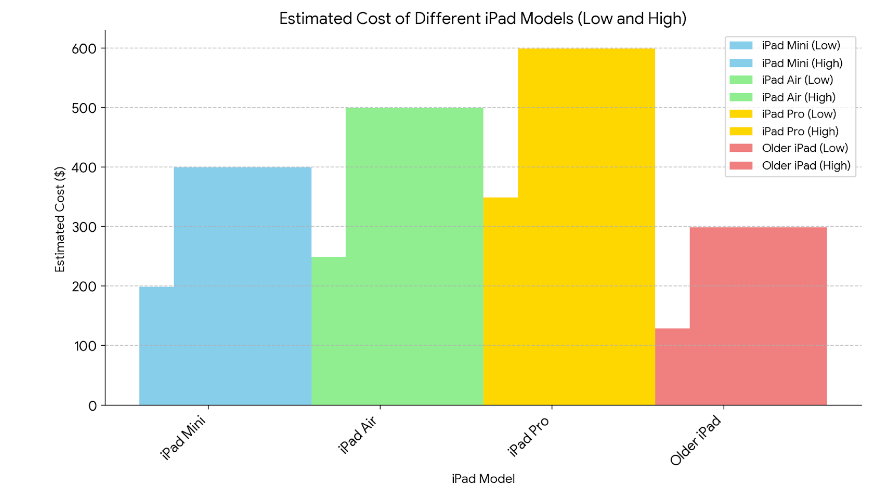
| iPad Category | Current AppleCare+ Fee |
|---|---|
| iPad Air (M2 and newer), iPad Pro (M4 and newer), iPad (A16), iPad mini (A17 Pro) | $29 for screen damage; $99 for other accidental damage |
| All other iPad models | $49 for other accidental damage; Apple does not list a separate $29 screen-damage tier for these models |
| No AppleCare+ / out of warranty | Model-specific estimate from Apple; final fee may depend on inspection |
Source: AppleCare service fees and deductibles and Apple iPad Repair and Service. Applicable taxes may be extra.
What Should You Ask About Replacement Parts?
Use Apple’s terminology instead of treating every higher-priced part as “OEM.” A quote can involve a genuine Apple part, a used genuine part, or a non-genuine aftermarket display. Apple says genuine parts are designed and tested for product performance, safety, and reliability.
- Genuine Apple display: Best fit for users who want Apple’s documented parts, calibration, and service-history support where available.
- Used genuine Apple part: Can be functional, but prior use and condition can vary.
- Non-genuine display: May cost less, but Apple warns that touch response, Apple Pencil accuracy, brightness, color, True Tone, and other display behavior can be affected.
For more detail, see Apple’s guidance on genuine iPad displays and iPad parts and service history. If you use a third-party shop, ask the technician to identify the part in writing and explain the repair warranty before you approve the work.
Does Warranty or AppleCare+ Cover a Cracked iPad Screen?
Apple’s standard limited warranty and AppleCare+ are not the same. The limited warranty covers eligible defects, not accidental drops or cracked screens. AppleCare+ adds accidental-damage protection, subject to the applicable service fee and plan terms.
How AppleCare+ Changes Screen Repair Cost
- Specified newer iPads: Apple currently lists a $29 U.S. service fee for screen damage on iPad Air (M2 and newer), iPad Pro (M4 and newer), iPad (A16), and iPad mini (A17 Pro).
- Other damage on those models: Apple lists a $99 U.S. fee for other accidental damage.
- All other iPad models: Apple lists $49 for other accidental damage and does not show a separate $29 screen-damage tier.
Does Apple’s Standard Warranty Cover a Cracked Screen?
| Coverage Type | Accidental Screen Damage? | What You Pay |
|---|---|---|
| Apple Limited Warranty | No, not for accidental damage | Out-of-warranty service cost if the damage is not otherwise covered |
| AppleCare+ | Yes, subject to plan terms | Applicable AppleCare+ service fee for the model and damage category |
Check your coverage before booking service. Apple also states that damage caused by a non-authorized repair provider is not covered by Apple’s Limited Warranty or AppleCare plan, although the provider may offer its own repair warranty.
Check Apple repair and coverage options before paying for any screen replacement.
Can You Replace an iPad Screen Yourself?
DIY iPad screen repair can save labor cost, but it is not automatically the cheapest outcome. The repair may involve adhesive, fragile display cables, battery-safety steps, calibration, and model-specific tools. Apple’s Self Service Repair program is intended for people who already have experience repairing electronic devices.
What Does a DIY iPad Screen Repair Include?

DIY cost depends on the exact iPad and whether the repair needs a full display assembly, glass/digitizer components, adhesive, tools, or post-repair software. Because those parts vary by model, a generic kit price is not a reliable estimate.
- Check the exact model number before ordering parts.
- Use the repair manual for that model, not a generic iPad video.
- Compare the total parts-and-tools cost with a professional quote.
What Are the Risks of Self-Repair?
| Risk | Why It Matters |
|---|---|
| Warranty coverage | Damage caused during a self-repair or non-authorized repair may not be covered by Apple. |
| Additional damage | Display cables, connectors, cameras, buttons, or the battery can be damaged during disassembly. |
| Display performance | An incorrect or non-genuine display can affect touch, brightness, color, Apple Pencil behavior, or calibration. |
| Safety | Improper tools or loose internal parts can create battery or overheating risks. |
For eligible models and regions, Apple Self Service Repair provides repair manuals and access to genuine Apple parts and tools. If you do not already have electronics-repair experience, professional service is the lower-risk route.
Should You Repair or Replace a Cracked iPad?
Repair is usually easier to justify when the damage is limited to the screen, the iPad still meets your performance needs, and the quote is comfortably below the cost of a comparable replacement. Replacement becomes more attractive when the iPad also has battery, charging, enclosure, camera, or performance problems.
How Do You Compare Repair With Replacement?
| Situation | Repair Usually Makes More Sense When | Replacement Deserves More Weight When |
|---|---|---|
| Screen-only damage | The iPad is otherwise reliable and the repair has a clear warranty | The repair quote is close to a comparable replacement |
| Older iPad | It still runs the apps you need and has acceptable battery life | You also need better performance, storage, battery life, or newer features |
| Multiple problems | The provider can fix all issues for a reasonable total | Screen damage is only one of several costly faults |
| AppleCare+ active | The applicable service fee is far below replacement cost | Replacement may still make sense if your needs have changed significantly |
What Should You Check Before Approving a Repair?
- Identify the exact iPad model and storage configuration.
- Check AppleCare+ or warranty status.
- Get the total repair quote, including labor, taxes, shipping, and diagnostic fees.
- Ask whether the part is genuine Apple, used genuine, or non-genuine.
- Compare the quote with a comparable new or refurbished replacement, not just the original purchase price.
Also consider resale value. A repaired iPad can be easier to sell, but do not spend more on a repair solely to increase resale value unless the math works in your favor.
Can Insurance or a Third-Party Warranty Cover an iPad Screen?
Insurance and retailer protection plans can reduce your out-of-pocket cost, but coverage is policy-specific. Do not assume a homeowners, renters, credit-card, carrier, or retailer plan covers accidental iPad screen damage until you read the claim terms.
How Can Insurance Change Your Repair Cost?
- Deductible: Compare the deductible with the repair quote before filing a claim.
- Accidental-damage coverage: Confirm that drops and cracked screens are included, not just manufacturing defects or theft.
- Claim limits: Check whether the plan limits the number or value of claims.
- Repair network: Some plans require a specific provider or approval before repair.
What Should You Check in a Third-Party Protection Plan?
| Plan Detail | Why It Matters | What to Confirm |
|---|---|---|
| Screen coverage | Not every plan includes accidental display damage | Whether cracked-screen repair or replacement is covered |
| Service fee or deductible | A claim may not be cheaper than paying for repair yourself | Your exact out-of-pocket amount |
| Repair provider | Parts and warranty terms can vary | Who performs the repair and what parts they use |
| Claim process | Pre-approval may be required | Documents, deadlines, shipping, and turnaround rules |
Get approval before authorizing a repair if your plan requires it. An unauthorized repair can cause a claim to be denied under some protection-plan terms.
Frequently Asked Questions About iPad Screen Replacement Cost
What Is the Cost to Replace an iPad Screen?
There is no single U.S. price for every iPad. With AppleCare+, Apple currently lists a $29 screen-damage fee for specified newer models. Other iPad models use a different accidental-damage fee category. Without AppleCare+, use Apple’s model-specific repair estimator or get a written quote from your repair provider.
Are iPad Screen Repairs Covered by Warranty?
Apple’s standard limited warranty does not cover accidental damage such as a screen cracked by a drop. AppleCare+ covers accidental damage subject to its service fees and terms. A manufacturing defect is a different situation and should be evaluated by Apple or an authorized provider.
Can I Repair My iPad Screen Myself?
Yes, but it is a high-skill repair on many models. Apple’s Self Service Repair program provides manuals, genuine parts, and tools for eligible products and regions and is intended for people experienced with electronic repair. Damage caused during self-repair may not be covered by Apple.
How Long Does an iPad Screen Repair Take?
Apple does not publish one universal turnaround time for every iPad screen repair. Timing can vary by service option, model, parts availability, location, shipping, and whether the device needs replacement rather than an in-store repair. Ask for the expected turnaround when you book service.
Does AppleCare+ Cost $29 for Every iPad Screen Repair?
No. Apple’s current U.S. fee schedule lists $29 for screen damage on iPad Air (M2 and newer), iPad Pro (M4 and newer), iPad (A16), and iPad mini (A17 Pro). For all other iPad models, Apple lists $49 for other accidental damage and does not show a separate $29 screen-damage tier.
Is It Worth It to Fix an iPad Screen?
It is usually worth considering repair when the iPad is otherwise in good condition, still meets your needs, and the total repair quote is well below the cost of a comparable replacement. Replacement deserves more consideration when the device also has battery, charging, enclosure, or performance problems.
Conclusion
Start with your exact iPad model and coverage status. If AppleCare+ is active, check the current service-fee category before paying an out-of-warranty quote. If you do not have coverage, compare Apple’s model-specific estimate with one or two written third-party quotes and ask exactly which part will be installed.
Repair is the better value when the damage is isolated and the iPad still fits your needs. Replacement becomes more sensible when the screen is only one of several problems or the total repair cost is too close to a comparable replacement.