

The cost of repairing a school computer can vary. The expense depends on the type of damage and parts needed (U.S., 2025).
School computers are essential for learning, and when they break, getting them fixed fast matters. Knowing what repairs actually cost helps schools budget more accurately and decide whether a repair or a full replacement makes more sense. A cracked screen costs very differently from a slow system, so understanding the breakdown is worth the time.

This guide breaks down the most common repair types, what they cost, and how to keep those costs manageable over time.
“Screen damage is the most frequent repair we handle for schools. Careful handling can prevent these costly repairs.” – Sarah Lee, Computer Repair Specialist
Quick Answer
- Most school computer repairs fall between $100 and $400, depending on the issue and parts needed.
- Screen replacement is the most common repair: $80–$300 (often ~$100 via district fee schedules).
- Keyboard and battery repairs typically run $30–$150 each.
- Software fixes (virus removal, OS reinstall) usually cost $80–$200 in labor.
- On-site technician rates range from $50–$150/hour; off-site is generally cheaper at $30–$100/hour.
- Regular maintenance, warranties, and spare parts programs can meaningfully reduce long-term repair spending.
Common Computer Issues
School computers face a lot of wear and tear. Understanding the most common problems makes it easier to plan ahead and manage costs.
Hardware Problems

Hardware issues are the most common category in school settings. These include:
- Broken screens
- Faulty keyboards
- Damaged ports
- Battery issues
Repairing a broken screen can cost between $80 and $300, depending on device type and parts availability. Many districts set fixed fees around $100 for screen damage.
Replacing a faulty keyboard typically runs $30 to $150. District fee schedules often list around $30 for Chromebook keyboards, while retail shops tend to charge more.
Damaged ports such as DC or USB-C charging jacks usually cost $100 to $150 or more in labor, with parts added on top.
Battery replacements run $60 to $150, depending on the model and whether the battery is internal or user-removable.
Software Malfunctions
Software problems can be just as disruptive as hardware failures. Common issues include:
- Virus infections
- System crashes
- Software compatibility issues
Virus removal typically costs $80 to $150. Many shops advertise around $100, though service bundles can run higher.
Fixing system crashes usually falls between $100 and $200, depending on diagnostics and any data recovery involved.
Resolving software compatibility problems generally costs $50 to $150. Operating system reinstallations typically reuse the device’s existing Windows digital license; a new license is only needed if one is not already attached to the device. Note: Windows 10 reached end of support on October 14, 2025. Extended security updates are available through October 2026.
These costs vary with the problem’s complexity. Regular maintenance can reduce how often software issues come up in the first place.
Factors Affecting Repair Costs
Several factors drive the final repair bill. Knowing them helps schools allocate budget more accurately.
Type Of Damage
The type of damage has the biggest influence on cost. Physical damage like a broken screen or keyboard tends to be expensive because it requires replacement parts. Software issues like viruses or system failures usually cost less, though complex cases can still add up.
Age Of The Computer
Older computers typically cost more to repair. Replacement parts for discontinued models can be hard to source, which pushes prices up. Newer devices often have warranties and readily available components, making repairs more predictable. Schools with aging device fleets may want to weigh repair costs against replacement, especially as devices near the end of their lifecycle. EdTech Magazine covers practical guidance on school device lifecycle planning.
Brand And Model
Brand matters too. High-end brands often have pricier parts and more specialized repair needs. Popular consumer brands tend to have cheaper and more widely available components. Knowing the exact brand and model before requesting a quote helps avoid surprises.
Cost Of Hardware Repairs
Hardware repair costs vary based on the component and the device. Here is a breakdown of the most common repairs schools face.
Products Worth Considering

Compatible Model: BRIGHTFOCAL New Screen Replacement for HP Chromebook 11 G3 G4 G4 EE G5 G6 G7 EE 11A G8 EE Non Touch, ProBook 11 G2, Stream 11 Pro G3 Series 11.6 HD Matte 30Pin Side Brackets LCD LED Display with Tool

【Instant Snap-on Magnetic Attachment】- The Patented Magnetic Privacy Screen – Protected by U.S. Patents 9,829,669 and D844,012. Simply place the privacy screen along the top of your MacBook and let the magnets attach along the top. No need for tricky placement, messy tape, or damaging adhesive. Easily remove and reattach when you need it.
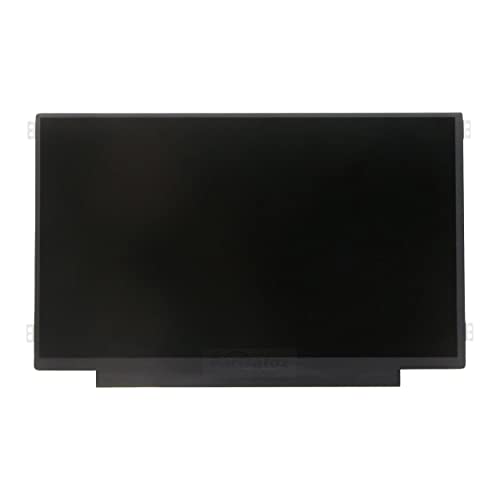
Brand New 11.6 inch LCD Screen Non-Touch Version, Side Brackets , NOT Compatible with HP Chromebook 11 G5/11 G5 EE/11 G6 EE/11A G6 EE/11 G7 EE/11 G8 EE/11A G8 EE 11 11MK G9 EE Touch Version
Screen Replacement
Screen replacements are the most frequent repair schools deal with. Replacing a laptop or Chromebook screen typically costs $80 to $300. District fee schedules commonly charge around $100; retail pricing varies based on panel type and labor.
Keyboard Repairs

Keyboards are vulnerable to spills and heavy daily use. Replacement costs range from $30 to $150, depending on the model and whether the palm rest is integrated into the keyboard assembly.
Battery Replacement
Batteries degrade over time and eventually need replacing. Depending on the laptop brand, model, and whether labor is included, a new battery runs from $60 to $150.
“Teaching students to use protective covers on keyboards can significantly reduce repair cases.” – Michael Carter, School IT Manager
Cost Of Software Repairs
Software repairs are often less visible than hardware issues, but they can still disrupt learning and carry real costs. Here is what schools typically pay.
Products Worth Considering
![MixPad Free Multitrack Recording Studio and Music Mixing Software [Download]](https://m.media-amazon.com/images/I/71ltIxIuz1L._SL500_.jpg)
Create a mix using audio, music and voice tracks and recordings.
![MixPad Multitrack Recording Software for Sound Mixing and Music Production Free [Mac Download]](https://m.media-amazon.com/images/I/51kaO82jYOL._SL500_.jpg)
Mix an audio, music and voice tracks

Virus Removal
Viruses slow computers down and can expose sensitive data. Removal costs range from $80 to $150, depending on the vendor and whether it is bundled with other services.
Operating System Reinstallation
A corrupted or badly degraded OS sometimes needs a full reinstall. Labor for this runs between $100 and $200. Most devices reactivate using an existing digital license, so a new Windows license is typically not required unless the device has never had one.
Software Updates
Failed or broken updates can cause performance issues. Fixing update problems usually costs $30 to $60 and gets the software running cleanly again.
| Software Repair | Cost Range |
|---|---|
| Virus Removal | $80 – $150 |
| Operating System Reinstallation | $100 – $200 (labor) |
| Software Updates | $30 – $60 |
Knowing these ranges helps schools budget for software maintenance and avoid letting small issues turn into bigger ones.
Labor Charges
Beyond parts, labor is a major cost driver. Rates differ depending on whether the technician comes to the school or the device is sent out for repair.
On-site Repairs
On-site repairs bring the technician directly to the school. This reduces downtime since computers stay on campus. The tradeoff is cost: on-site rates typically run $50 to $150 per hour, based on the complexity of the issue and the technician’s experience.
This option works best for urgent problems where minimizing disruption is the priority.
Off-site Repairs
Off-site repairs involve shipping or transporting the computer to a repair shop. Rates are generally lower, around $30 to $100 per hour, but turnaround takes longer. Transportation adds a small cost, and schools need to account for the time devices are out of service.
Off-site is a practical choice for non-urgent or more complex repairs where cost savings matter more than speed.
DIY Vs Professional Repairs
Choosing between DIY and professional repairs involves weighing cost, risk, and time. Both paths have real advantages and drawbacks.
Products Worth Considering

The original electronics toolkit: Designed for computer, smartphone, tablet, and gaming repair, backed by thousands of free instructions.
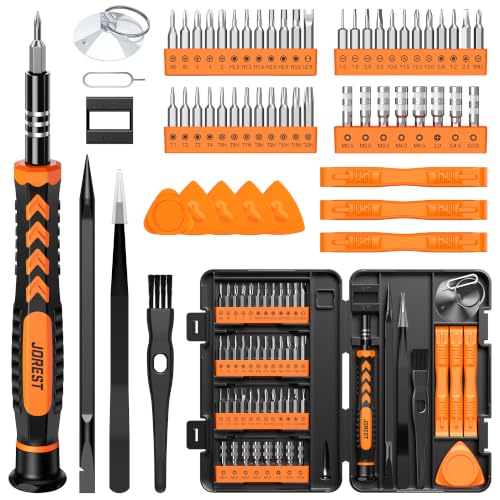
【59 in 1 Precision Screwdriver Set】The screwdriver set contains 44 screwdriver bits, Phillips PH000,PH00,PH0,PH1,PH2; Flathead -1.0, -1.5 -2.0,-3.0; Torx T1 T2 T3 T4 T5, Torx security TR6 TR7 TR8 TR9 TR10 TR15 TR20; Triwing Y0.6, Y1.5. Y2.3, Y3.0; Pentalobe P2(0.8) P5(1.2); Triangle 2.3; U-type U2.6; H-type: H0.9, H1.3, H1.5, H2.0, H2.5, H3.0; MID-type: MID; Sleeve: M2.5, M3.0, M3.5, M4.0, M4.5, Cross 2.0, G3.8, G4.5
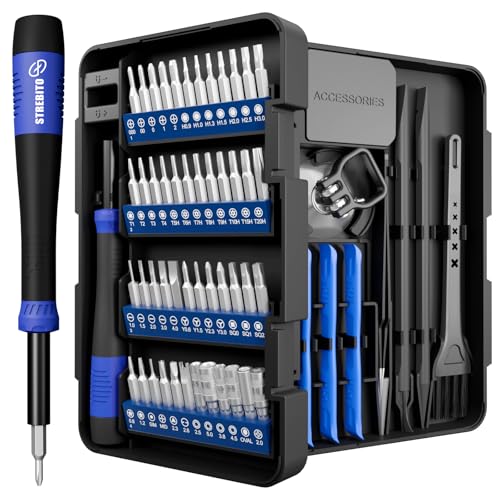
64-in-1 Precision Screwdriver Set: This small screwdriver set includes 48 bits (Phillips, Flathead, Torx, Torx security, Triwing, Pentalobe, Hex, Triangle, U-type, Square, SIM, MID, OVAL, Gamebit, Nut driver). It's a complete electronics repair kit that has been professionally designed to repair computers, PC, laptops, Macbooks, tablet, phones, PS4 PS5, XBOX, Switch, eyeglasses, drone, watches, Ring doorbells and more
Pros And Cons Of DIY
DIY repairs eliminate labor costs, which can be significant. You also build useful skills in the process. Free step-by-step repair documentation is widely available through resources like iFixit’s free repair guides, which cover many school device models in detail.
The risks are real, though. A mistake can cause additional damage, especially with tightly integrated components. Some repairs require specialized tools that are not easy to source. And performing DIY work on a device under warranty can void that warranty, creating bigger expenses down the line.
Benefits Of Professional Services
Professional technicians bring experience, proper tools, and familiarity with specific device models. They can diagnose and fix issues faster, which reduces the time students are without their computers. Most professional repairs also come with a service warranty, providing some protection if the problem returns.
Quality matters here too. Shops that use genuine parts and follow manufacturer guidelines tend to produce more reliable results. The upfront cost is higher, but fewer repeat repairs often make it the more economical choice over time.
Warranty And Insurance
Warranties and insurance can significantly reduce what schools actually pay out of pocket for repairs. Understanding what each covers helps when budgeting for device protection.
Manufacturer Warranty
Most school computers include a manufacturer’s warranty, typically lasting one year. It covers defects in materials and workmanship. If the device fails within that period, the manufacturer will repair or replace it at no charge.
Read the terms carefully. Many warranties exclude accidental damage or misuse, which are common in school environments. Knowing those limits avoids unexpected costs.
Extended Warranty
An extended warranty is an optional purchase that extends coverage beyond the standard period, often to three years or more. Many extended warranties also include accidental damage protection, which is particularly valuable in schools.
Key benefits include:
- Longer coverage period
- Inclusion of accidental damage
- Priority repair service
Extended warranties do add cost upfront. It is worth comparing the premium against the expected repair rate for the device fleet before purchasing.
Insurance Coverage
Insurance coverage goes further than a warranty by covering theft, loss, and a broader range of damage types. Different policies offer different levels of protection, so choosing one that fits the school’s actual risk profile matters.
Typical insurance policies may cover:
| Type of Coverage | Description |
|---|---|
| Theft | Covers the cost of replacing a stolen computer |
| Accidental Damage | Covers repairs for drops, spills, and other accidents |
| Loss | Covers the cost of replacing a lost computer |
Premiums vary by policy and provider. Comparing options and checking what is and is not covered ensures the school’s technology investment is adequately protected.
Cost-saving Tips
Repair costs add up quickly across a large device fleet. A few practical habits can keep those expenses under control.
Regular Maintenance
Routine check-ups catch small problems before they become expensive ones. Clean hardware regularly to prevent dust buildup, keep software updated, and address minor issues early. Consistent care is one of the most cost-effective investments a school IT team can make.
Using Spare Parts
Stocking refurbished or surplus parts for common repairs can cut costs significantly. Many reputable suppliers offer quality components at lower prices than buying new. Having these on hand also speeds up turnaround when a device breaks down.
Negotiating Repair Costs
Always get multiple quotes before committing to a repair vendor. Compare pricing and service terms, and ask about bulk repair discounts. Some shops offer reduced rates for schools or educational institutions. It is worth asking directly.
“Most slow computers can be fixed with simple software updates and regular maintenance.” – Robert Hayes, IT Consultant
Frequently Asked Questions
How Much Does It Cost To Repair A School Computer?
The cost to repair a school computer typically ranges from $100 to $400. The final price depends on the issue, the parts required, and whether the repair is done on-site or off-site.
What Factors Affect School Computer Repair Costs?
Repair costs depend on the damage type, required parts, and labor. The computer’s brand, model, and age also influence pricing.
Is It Cheaper To Repair Or Replace A School Computer?
Repairing is usually the better choice for minor damage. For major issues on older devices, replacement can be more cost-effective in the long run.
How Long Does A School Computer Repair Take?
Repair time typically ranges from 1 to 3 weeks, depending on the extent of the damage and parts availability.
Conclusion
School computer repair costs vary widely based on what is broken, how old the device is, and who does the work. Simple fixes can be affordable; major hardware issues or complex software problems cost more. Comparing repair quotes, investing in warranties, and keeping up with routine maintenance are the most reliable ways to protect the school’s technology budget.
When repair costs approach the price of a replacement, it is worth running the numbers. A proactive approach saves money and keeps students learning without interruption.
